Buy and Sell Plans
You can view the Buy and Sell Plans associated with your SIMs to manage your billing policies and ensure they align with your business needs.
| Type of Plan | Description |
|---|---|
| Buy Plans | Access and review the Buy Plans created by your parent account. These plans are for SIMs in your inventory, but you cannot modify them as they are managed by the parent account. |
| Sell Plans | View and manage the Sell Plans that you have created for SIMs assigned to your child accounts (customers). These plans define the billing terms for the SIMs your customers use. |
A screen capture of the Sell and Buy Plans table is shown here.
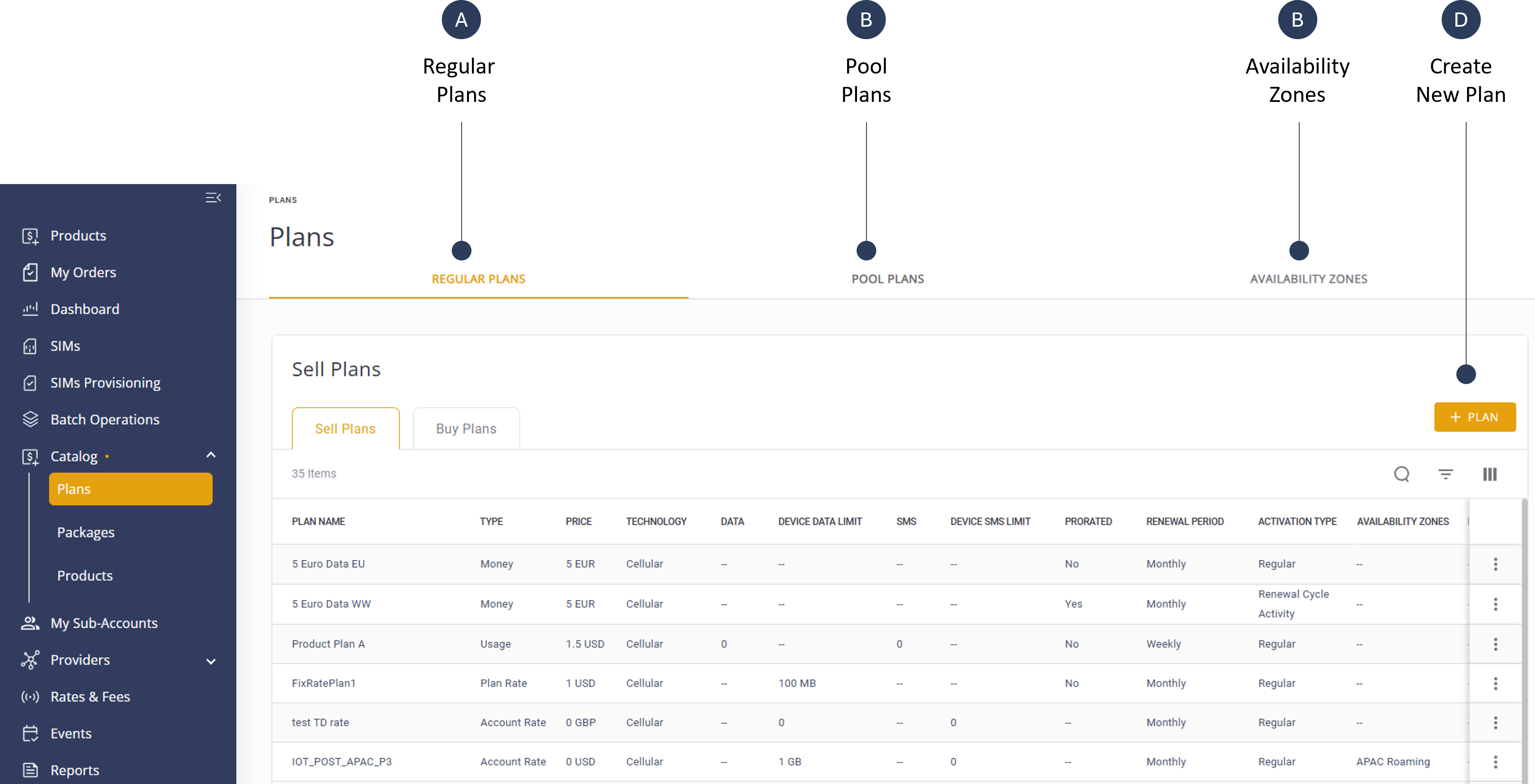
A description of the Sell/Buy Plan table columns is provided here.
| Column Header | Description |
|---|---|
| Activation Type | The method of activating the plan. |
| Allocated Sims | The number of SIM cards included in the plan. |
| Availability Zones | Geographic regions where the plan is available. |
| Cost/Price | The total Cost for a Buy Plan or the Price for a Sell Plan. |
| Data | The total data allowance provided. |
| Device Data Limit | The data usage limit per device. |
| Device SMS Limit | The SMS usage limit per device. |
| Eligible Accounts | The sub-accounts that can use a plan based on settings from the parent account. |
| Expiration Strategy | The expiration date of the plan |
| Plan Name | The name of the connectivity plan. |
| Prorated | Indicates whether charges are prorated. |
| Providers | The providers associated with the plan. |
| Renewal Period | The frequency of plan renewal. |
| SMS | The total number of SMS messages included. |
| Technology | The type of connectivity service (cellular or satellite). |
| Type | The plan type (e.g., Usage, Rate, Money). |
View Buy Plans
To view Buy Plans created by your parent account, do these steps:
- Select Catalog |Plans from the Navigation sidebar.
- Select the Regular Plans or Pool Plans tab.
- Click the Buy Plans tab to display the plans created by your parent account.
NOTE: You can view the buy plans created by your parent account, but you cannot edit these plans.
View Sell Plans
To view the Sell Plans you have created and assigned to your child accounts, do these steps:
- Select Catalog |Plans from the Navigation sidebar.
- Select the Regular Plans or Pool Plans tab.
- Click the Sell Plans tab to display the plans you have created and assigned to your child accounts.